Are Options Flow Trades Buys or Sells?
Options flow is most useful when you know where the trade executed relative to the bid and ask.
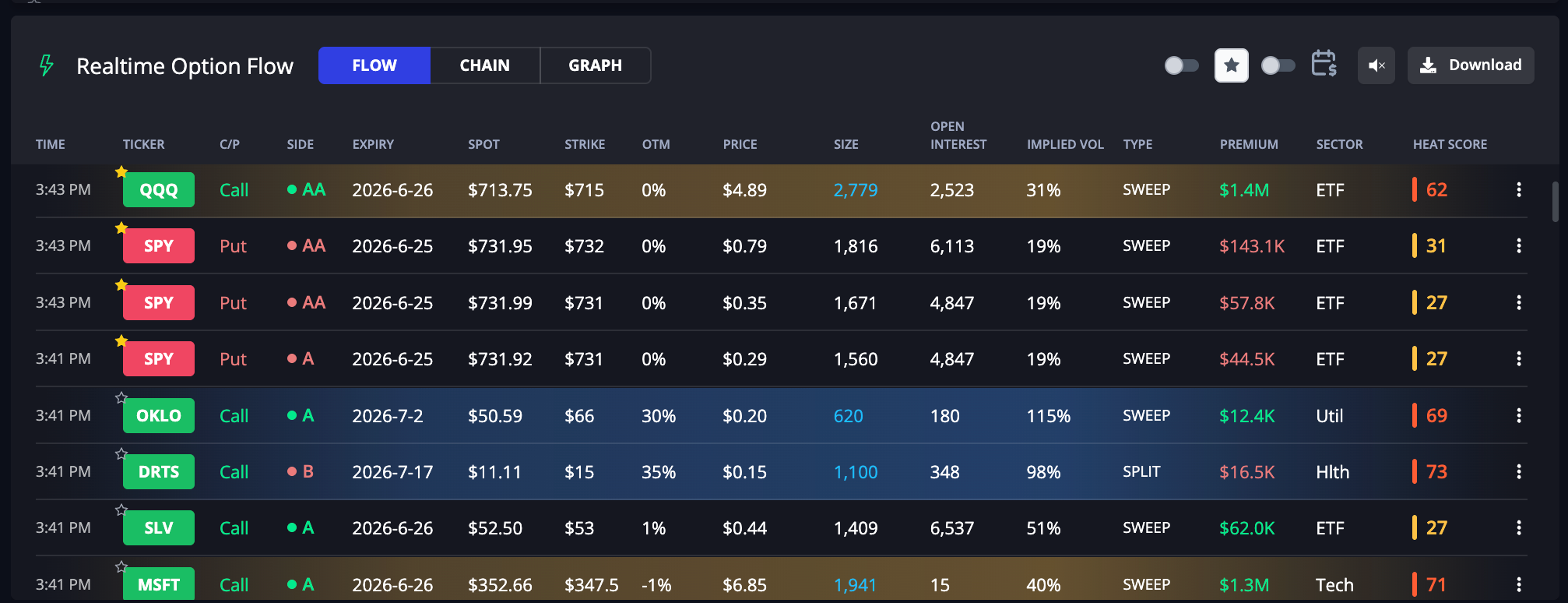
A call trade and a put trade can mean very different things depending on whether the trader paid the ask, sold at the bid, or traded near the midpoint.
That is why InsiderFinance lets you choose the exact Trade Side you want to analyze directly from the Command Center.
Use Trade Side to choose whether you want ask-side buying, bid-side selling, midpoint prints, or the full feed. Use Total or Net mode to decide whether you want gross activity or directional pressure.
The simplest way to think about it:
Trade Side controls which trades you include. Mode controls how those trades are measured.
What Is Trade Side in Options Flow?
Every options trade prints somewhere relative to the market’s bid and ask.
- The bid is where buyers are willing to buy.
- The ask is where sellers are willing to sell.
- The midpoint is between the two.
When a trade executes closer to the ask, it usually means the aggressor was willing to pay up to get filled.
When a trade executes closer to the bid, it usually means the aggressor was willing to sell into demand.
When a trade executes near the midpoint, the directional read is less clear.
InsiderFinance groups those executions into six Trade Side choices:
| Trade Side | Meaning | Typical interpretation |
|---|---|---|
| Above Ask | Trade executed above the displayed ask | Most aggressive ask-side execution |
| Ask | Trade executed at/near the ask | Likely buyer-initiated |
| Mid | Trade executed around the midpoint | No clear directional side read |
| Bid | Trade executed at/near the bid | Likely seller-initiated |
| Below Bid | Trade executed below the displayed bid | Most aggressive bid-side execution |
| All | Includes every side | Full-spectrum flow view |
The default InsiderFinance view focuses on Above Ask + Ask, which preserves the classic “high-conviction buying” workflow.
But you can also broaden the feed to include bid-side trades, midpoint trades, or everything at once.
How to Select Trade Sides in Command Center
Open the Command Center and use the Trade Side row.

You can select:
- Above Ask + Ask for the classic buy-side flow view.
- Bid + Below Bid to study sell-side or premium-selling flow.
- Mid when you want to include midpoint prints.
- All when you want the complete flow feed.
- Any custom combination, such as Ask + Bid or Above Ask + Below Bid.
Selecting a trade side changes which trades are included in the table, aggregations, top ticker panels, and related flow views.
A key product change: Above Ask and Below Bid are now part of Trade Side, not Flow Type. They describe execution side, not whether the order was a sweep, block, split, unusual trade, or other flow type.
Are Ask-Side Trades Buys?
Usually, yes.
A trade at the ask or above the ask generally means the buyer was more aggressive. They crossed the spread and paid the seller’s asking price, or even paid through it.
For options flow, that means:
| Trade | Ask-side read |
|---|---|
| Call at Ask / Above Ask | Bullish call buying |
| Put at Ask / Above Ask | Bearish put buying or hedge demand |
This is why ask-side options flow has historically been the cleanest way to read short-term institutional intent.
A large call sweep above the ask is often read as urgent bullish demand. A large put sweep above the ask is often read as urgent bearish demand or downside protection.
But “buy” does not automatically mean “new position.” A trader may be opening a new position, closing a short option, hedging, rolling, or adjusting a spread.
Trade side tells you where the trade printed. It does not perfectly reveal the trader’s full book.
Are Bid-Side Trades Sells?
Usually, yes.
A trade at the bid or below the bid generally means the seller was more aggressive. They accepted the bid rather than waiting to sell at a better price.
For options flow, that changes the directional interpretation:
| Trade | Bid-side read |
|---|---|
| Call at Bid / Below Bid | Bearish call selling or long-call closing |
| Put at Bid / Below Bid | Bullish put selling or long-put closing |
This is where many traders misread flow.
A large put trade is not automatically bearish.
If that put prints on the bid, it may be a trader selling puts, which can be bullish or income-oriented.
Likewise, a large call trade on the bid may reflect call selling, which can be bearish, income-oriented, or a position close.
That is why Trade Side matters. The contract type alone is not enough.
What About Midpoint Trades?
Midpoint trades are useful, but they are not clean directional signals.
A trade that prints at the midpoint does not clearly show whether the buyer or seller was more aggressive.
It may be negotiated, algorithmic, part of a larger spread, or simply executed where the market met in the middle.
Use Mid when you care about total activity and liquidity. Do not treat midpoint prints as reliable buy/sell signals.
In InsiderFinance, midpoint trades can be included in Total mode because they are real contracts and premium. But they do not drive Net directional metrics because they do not have a reliable bullish or bearish side read.
Total Mode vs Net Mode
InsiderFinance now gives you two ways to measure flow:
| Mode | What it answers | Best use |
|---|---|---|
| Total | “How much flow happened?” | Finding size, activity, volume, premium, unusual flow |
| Net | “Which direction dominated?” | Finding bullish vs bearish imbalance |
Total Mode
Total mode sums the selected flow.
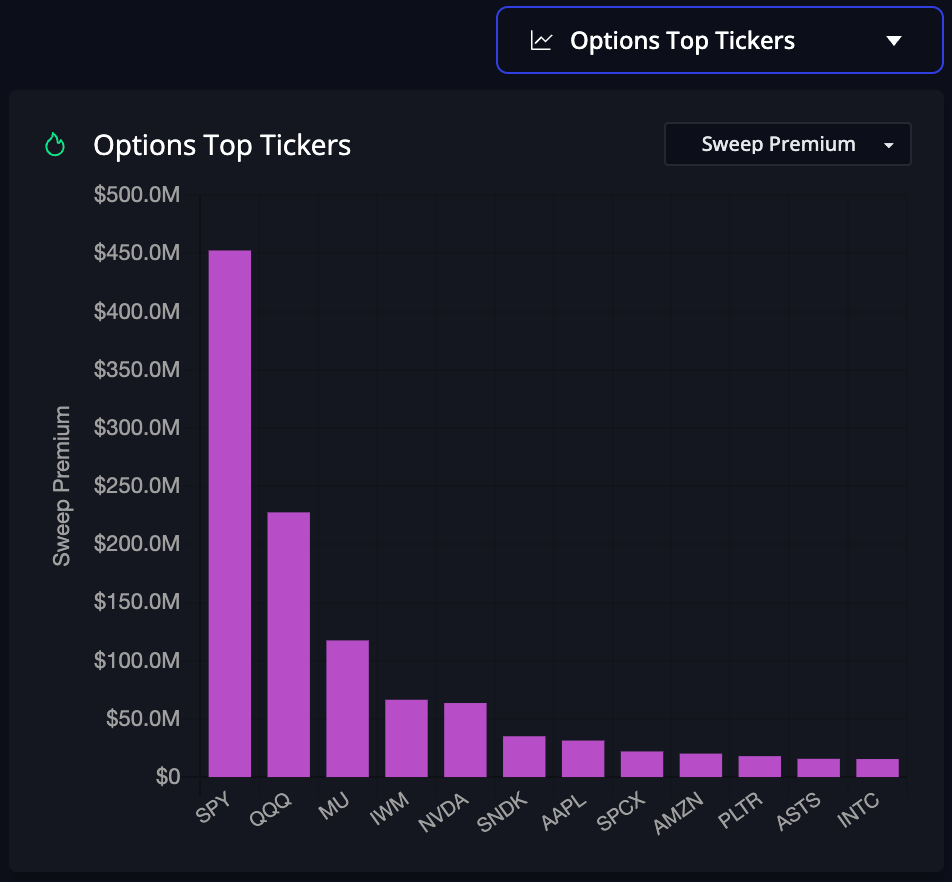
If you select Above Ask + Ask, Total mode shows the total contracts and premium from ask-side flow.
If you select All, it shows total contracts and premium across all sides.
Total mode is best when you want to answer:
- Which tickers have the most options activity?
- Where is the largest premium trading?
- Which symbols have the most unusual flow?
- Which names are seeing the biggest sweeps?
- How much call or put premium is printing?
Total mode is intentionally simple. It measures gross activity.
That makes it excellent for discovery. A ticker with massive total premium is worth attention even if the flow is mixed.
But total flow can hide directional conflict. A stock may have huge call buying and huge put buying at the same time.
Total mode will show the activity, but it may not show the directional tug-of-war clearly.
That is where Net mode helps.
Net Mode
Net mode subtracts bearish flow from bullish flow.
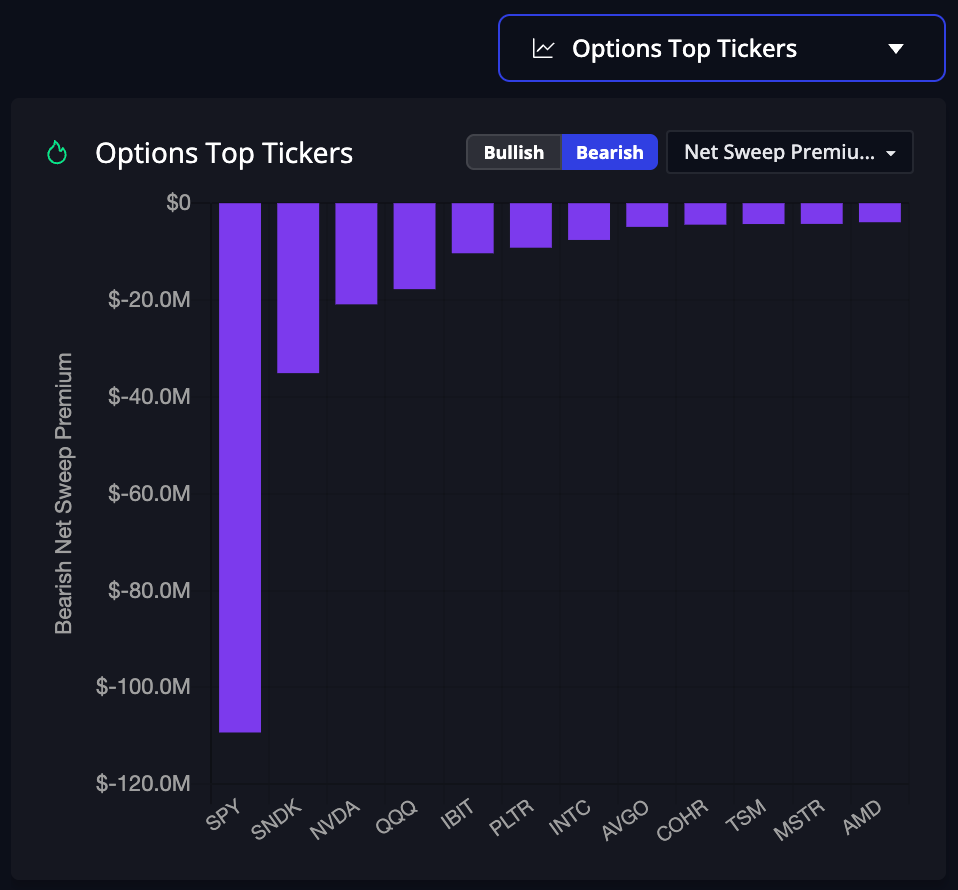
InsiderFinance classifies each directional trade using both the option type and the trade side:
| Trade type | Directional read |
|---|---|
| Call bought on Ask / Above Ask | Bullish |
| Put bought on Ask / Above Ask | Bearish |
| Call sold on Bid / Below Bid | Bearish |
| Put sold on Bid / Below Bid | Bullish |
| Midpoint trade | Neutral / excluded from directional net |
Net mode then calculates:
Net Premium = Bullish Premium − Bearish Premium
And:
Net Premium % = Net Premium ÷ Directional Premium
A positive Net Premium % means bullish premium dominated.
A negative Net Premium % means bearish premium dominated.
A value near zero means bullish and bearish flow were more balanced.
Net mode is useful because it converts the full bid/ask spectrum into a cleaner directional read.
For example, imagine a ticker has:
- $5M in call premium bought on the ask
- $4M in put premium bought on the ask
Total premium is $9M. Total mode tells you there was a lot of activity.
Net mode shows the directional difference:
- Bullish premium: $5M
- Bearish premium: $4M
- Net premium: +$1M
That is still bullish, but only slightly.
Now imagine another ticker has:
- $2M in call premium bought on the ask
- $6M in put premium sold on the bid
A simple put/call read might make that look bearish because there is more put premium.
But side matters. Bid-side put flow is generally bullish because it implies put selling or long-put closing.
Net mode reads both trades as bullish and surfaces the directional imbalance.
When to Use Total Mode
Use Total mode when you want to find where the action is.
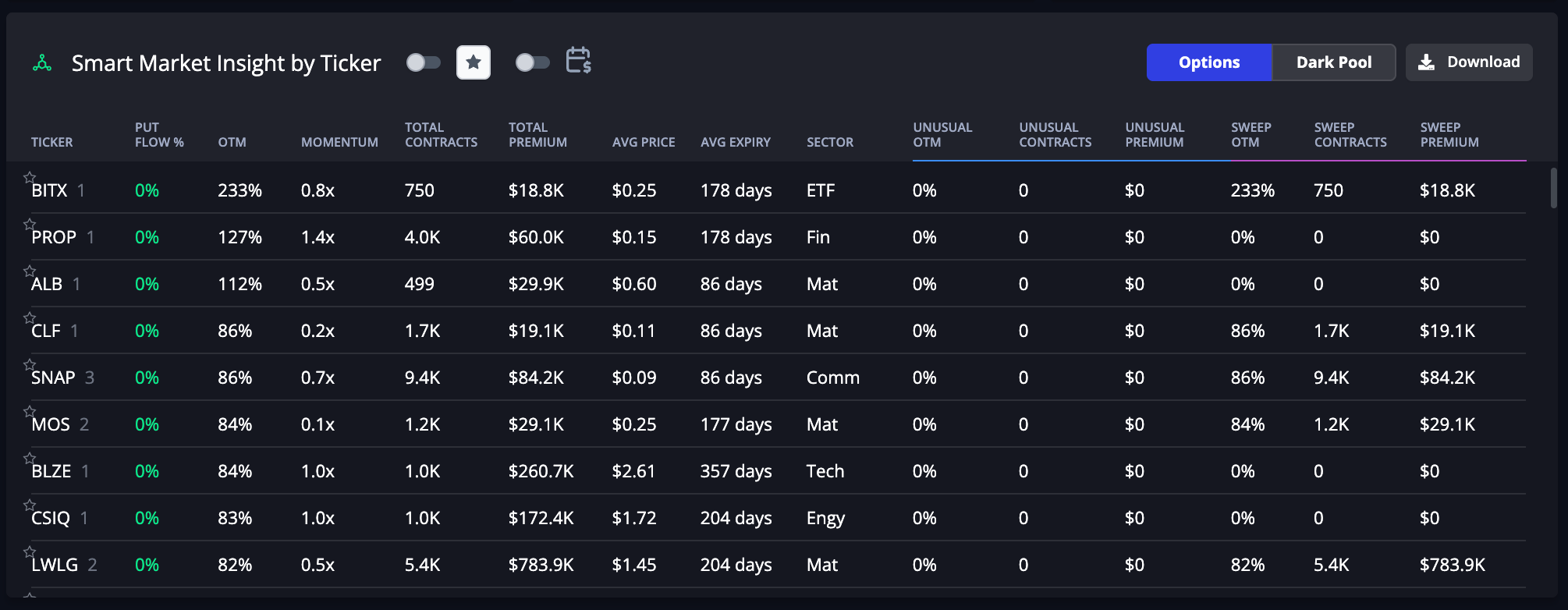
Total mode is best for:
- Spotting unusually active tickers.
- Ranking names by total premium.
- Finding high-volume sweeps and blocks.
- Comparing call premium vs put premium.
- Monitoring broad flow activity without forcing a directional conclusion.
Total mode is especially useful with the default Above Ask + Ask view because ask-side flow has a cleaner interpretation:
- Ask-side calls suggest bullish demand.
- Ask-side puts suggest bearish demand.
If your strategy is built around unusual buying pressure, start with the default ask-side view in Total mode.
When to Use Net Mode
Use Net mode when you want directional clarity.
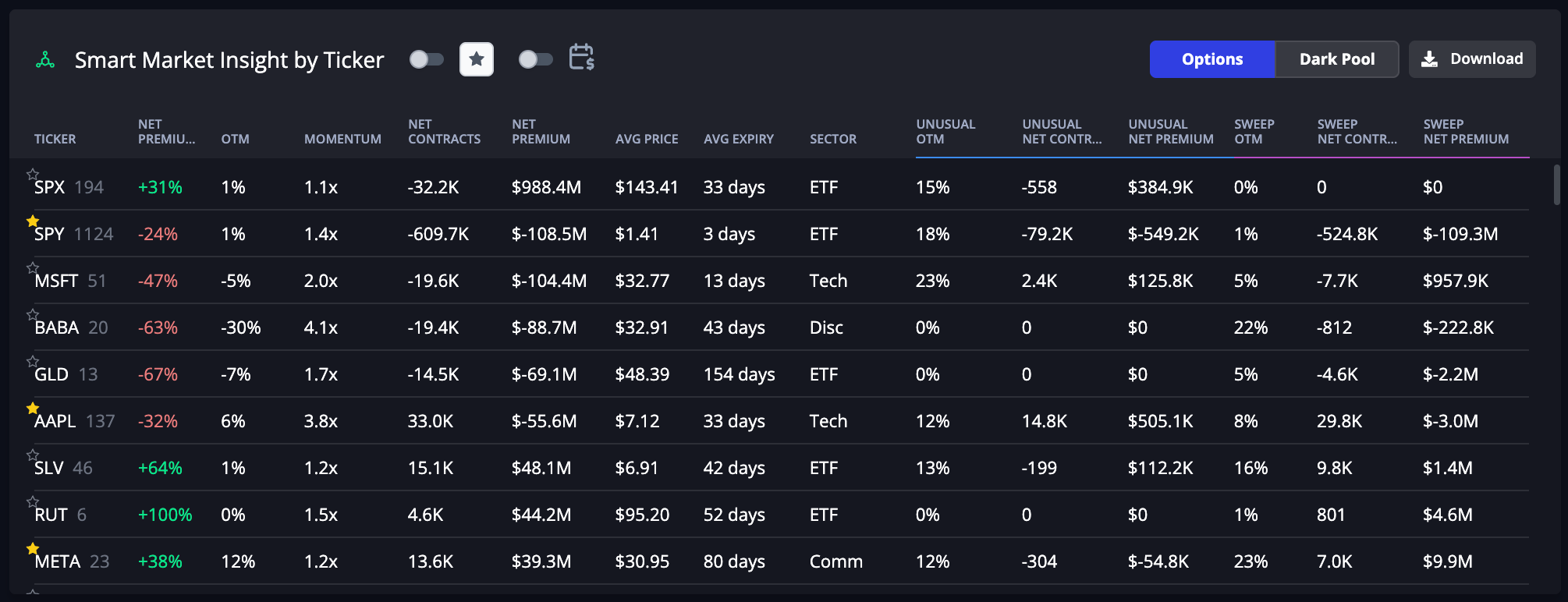
Net mode is best for:
- Comparing bullish vs bearish pressure.
- Studying all-side flow without double-counting mixed signals.
- Finding tickers where premium is directionally one-sided.
- Separating noisy high-volume names from cleaner directional setups.
- Understanding whether bid-side flow changes the read.
Net mode is especially useful when you select All trade sides.
Once bid-side trades are included, call/put totals alone can become misleading. Net mode accounts for whether calls and puts traded on the ask or the bid.
A good practical workflow:
- Use Total mode to find where the biggest activity is.
- Switch to Net mode to see whether that activity is bullish, bearish, or balanced.
- Open the ticker and inspect the individual trades, expirations, strikes, premium, and execution side.
How to Read Each Trade Side
Above Ask
Above Ask trades are the most aggressive ask-side prints. A trader paid more than the displayed ask to get filled.
This often signals urgency.
- Above Ask Call: aggressive bullish demand.
- Above Ask Put: aggressive bearish demand or hedge demand.
Above Ask trades are useful when you want the strongest expression of buyer urgency.
Ask
Ask trades print at or near the offer.
- Ask Call: likely call buying; bullish read.
- Ask Put: likely put buying; bearish or hedge read.
This is the classic options flow signal most traders are familiar with.
Mid
Mid trades print near the midpoint between bid and ask.
They count as activity, but they do not provide a clean side read.
Use Mid to study participation and volume. Avoid treating Mid as a clean buy or sell signal.
Bid
Bid trades print at or near the bid.
- Bid Call: likely call selling or call closing; bearish or income-oriented read.
- Bid Put: likely put selling or put closing; bullish or income-oriented read.
Bid-side trades are important because they show supply, premium selling, and potential closing activity that ask-only flow would miss.
Below Bid
Below Bid trades are the most aggressive bid-side prints. A trader sold below the displayed bid to get filled.
- Below Bid Call: aggressive call selling; bearish read.
- Below Bid Put: aggressive put selling; bullish read.
Below Bid can be especially useful when searching for urgent selling pressure or aggressive premium-selling activity.
All
All includes the complete trade-side spectrum: Above Ask, Ask, Mid, Bid, and Below Bid.
Use All when you want the broadest possible view of options activity. Pair it with Net mode when you want the cleanest directional summary.
Trade Side vs Flow Type
Do not confuse Trade Side with Flow Type.
Trade Side tells you where the trade executed:
- Above Ask
- Ask
- Mid
- Bid
- Below Bid
- All
Flow Type tells you what kind of trade it was:
- Sweep
- Golden Sweep
- Block
- Split
- Unusual
- High Heat
- Top Position
A trade can be both an Above Ask Sweep and an Unusual trade. Those are different dimensions of the same print.
Trade Side answers: Was the trade buyer-initiated, seller-initiated, or unclear?
Flow Type answers: What kind of order or signal is this?
Practical Examples
Classic bullish ask-side flow
You select:
- Trade Side: Above Ask + Ask
- Mode: Total
You see a ticker with heavy call premium, multiple sweeps, and short-dated expirations.
That is a classic bullish options flow setup: traders are paying the ask for calls, and total premium is concentrated on the call side.
High activity but mixed signal
You select:
- Trade Side: All
- Mode: Total
A ticker shows massive total premium, but both calls and puts are active across bid and ask.
That tells you the ticker is important, but not necessarily directionally clean.
Switch to Net mode. If Net Premium % is close to zero, the flow may be two-sided. If Net Premium % is strongly positive or negative, one side is dominating.
Put-heavy flow that is actually bullish
You select:
- Trade Side: Bid + Below Bid
- Mode: Net
You see heavy put premium on the bid.
That may indicate put selling or long-put closing. Net mode can classify that as bullish pressure rather than simply calling it “bearish put flow.”
This is one of the biggest benefits of all-side flow: it prevents over-simplified call/put readings.
Best Practices
Start with the default view
The default Above Ask + Ask view is still the cleanest starting point for most traders because it focuses on buyer-initiated flow.
Use this when you want quick, high-signal unusual options activity.
Use All + Net for the broadest directional read
When you want the full market picture, select All trade sides and switch to Net mode.
This helps you see whether bullish or bearish premium is actually dominating after accounting for both ask-side and bid-side trades.
Do not over-read midpoint trades
Midpoint prints are real flow, but they are not strong directional evidence.
They are useful for total activity and liquidity context. They should not be treated the same as ask-side buying or bid-side selling.
Remember that trade side is not position intent
A bid-side call could be a trader opening a short call, closing a long call, or legging into a larger strategy. An ask-side put could be a bearish bet, a hedge, or part of a spread.
Trade side gives you a better read than contract type alone, but it is not a complete view of the trader’s portfolio.
Use it alongside:
- Strike and expiration.
- Premium size.
- Open interest.
- Volume relative to open interest.
- Stock price action.
- Implied volatility.
- Repeated activity in the same ticker or chain.
Bottom Line
Options flow is not just a question of “calls or puts.” The better question is:
What traded, where did it execute, and did bullish or bearish premium dominate?
Use Trade Side in the Command Center to choose the flow you want:
- Above Ask + Ask for classic buyer-initiated flow.
- Bid + Below Bid for seller-initiated and premium-selling flow.
- Mid for non-directional midpoint activity.
- All for the complete picture.
Then use Total mode to measure gross activity and Net mode to measure directional imbalance.
That combination gives you a cleaner, more flexible read of modern options flow.
HIGH POTENTIAL TRADES SENT DIRECTLY TO YOUR INBOX
Add your email to receive our free daily newsletter. No spam, unsubscribe anytime.
FAQs
Are all InsiderFinance flow trades buys?
No. InsiderFinance now supports the full trade-side spectrum. You can still focus on ask-side trades, but you can also include bid-side trades, midpoint trades, or all sides.
What is the best Trade Side setting?
For the cleanest classic flow view, use Above Ask + Ask.
For the broadest view, use All.
For directional analysis across all sides, use All + Net mode.
Is Above Ask stronger than Ask?
Generally, yes. Above Ask means the trade executed above the displayed ask, which can indicate more urgency than a standard ask-side print.
It does not guarantee the trade will work. It only tells you the execution was aggressive.
Is Below Bid stronger than Bid?
Generally, yes. Below Bid means the trade executed below the displayed bid, which can indicate more aggressive selling pressure.
As always, context matters.
Why does Net mode matter?
Total mode shows how much flow happened. Net mode shows whether bullish or bearish premium dominated.
That matters because all-side flow can include call buying, put buying, call selling, put selling, and midpoint trades. Net mode turns those different trade types into a cleaner directional summary.
Does Net mode change which trades I see?
No. Trade Side changes which trades are included. Mode changes how the selected trades are aggregated.
Use Trade Side to control the dataset. Use Total or Net to control the calculation.